Item announced incorrectly and shipped incorrectly
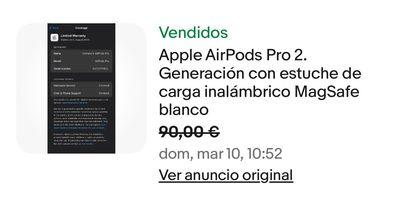

Good afternoon. I buy an item advertised as shown in the photo AirPod Pro 2 with wireless charging case. And they send only the case. Returns not accepted

josemcampos-0
1 comment
Good afternoon. I buy an item advertised as shown in the photo AirPod Pro 2 with wireless charging case. And they send only the case. Returns not accepted
alvaro@ebay
Hello,
The eBay Customer Guarantee, will cover you if your item arrives defective or is different from what was listed in the ad, if that is the case you can open a return request, based on our eBay Customer Guarantee
If you have received an item that is not as described, make sure the reason for the return is "item different from listing description" once the return is opened the seller must give you a prepaid return label or the necessary funds via PayPal so you can send the item back to the seller with a tracking number without having to pay for it yourself, once your tracking number confirms that the item has been delivered to the seller, the seller will have two business days to issue a refund.
If the seller does not issue the refund within two business days after receiving the item, you can ask us for help to step in on the case once the two business days have passed. You can also ask us for help if, after 3 business days since you opened the case, the seller never gave you a prepaid return label or the necessary funds via PayPal to return the item
Simply make sure that no more than 30 days have passed since you received the item, since that is the time period covered by our eBay Customer Guarantee; if it is outside this period, it is likely that you will not be able to open the case and in that case we would recommend contacting the seller to sort it out directly with them.
-------------------------------------------------------------------------------------------------------------------
This space is for comments and "User to User" help; in this channel, we will not be able to provide full Customer Service support. To access our help channels, you can go to our Help Pages where you can select a topic and find information to use our self-service links or, at the bottom of each page, you can see the link to contact our customer service channels